
Organise tax documents and make an emergency document kit on your Mac
OneMacTools helps you organise tax documents on your Mac and keep your important papers safe. Life Admin gathers a tax year's forms, payslips, statements and receipts into a Tax Pack folder with a spending spreadsheet, finds papers that exist only on this Mac and copies them to a cloud, flags files with ID or account numbers, and builds an emergency document kit: one AES-256 encrypted disk image your family can open with a password.
On this page
- Where these tools live
- Money & warranties: what your receipts add up to
- How to organise tax documents on a Mac with Tax Pack
- Safety net: papers kept only on this Mac
- Sensitive files with ID or account numbers
- What is an emergency document kit?
- How to make and open the Emergency Kit
- Tools mentioned on this page
- Questions
Where these tools live
Everything on this page is part of Life Admin, under Your Mac in the sidebar. Scroll down past Expiring soon and you'll find five sections: Money & warranties, Tax Pack, Safety net, Sensitive files and Emergency kit.
They all work from what Life Admin has read in your documents, across your Mac and every cloud Files covers. If you haven't turned Life Admin on yet, start with Life Admin: track expiry dates; it explains how reading works and how to pick your region, which sets the tax year.
Money & warranties: what your receipts add up to
This section totals every receipt and invoice Life Admin read for a tax year. Pick the year from the menu beside the title: this tax year and the three before it. In the United States years run January to December; in India, April to March (FY 2026-27).
- Totals: one big figure per currency, with how many receipts and invoices it comes from. Amounts in different currencies are kept apart and never converted.
- By month: a bar chart of the most common currency.
- Where it went: your top six merchants, with how many receipts each.
- Under warranty: up to eight purchases whose warranty hasn't ended, soonest first.
Click Export CSV… to save the year as a spreadsheet named like Money 2026.csv. It has the columns Date, Merchant, Amount, Currency, Type and File, so you can sort it in Numbers or hand it to whoever does your books.
A receipt saved in two places (Downloads and Google Drive, say) is counted once. Totals come from the amount printed on each receipt, so a receipt with no readable total is left out rather than guessed.
How to organise tax documents on a Mac with Tax Pack
At tax time the hard part isn't the forms, it's finding them: a W-2 in email downloads, payslips in OneDrive, bank statements in iCloud Drive, receipts everywhere. Tax Pack shows how many papers of each kind Life Admin found for the chosen year:
| Kind | Examples it recognises |
|---|---|
| Tax Documents | W-2, 1099, 1040, IRS letters; Form 16, 26AS, ITR acknowledgements, GST papers |
| Payslips | Pay stubs and salary slips |
| Bank Statements | Account statements and passbooks |
| Invoices | Bills and tax invoices |
| Receipts | Order confirmations and payment receipts |
| Insurance | Policy schedules and premium receipts |
A paper belongs to a year by the date printed on it when that's known (a receipt's date), or otherwise by the file's date.
Make a Tax Pack folder
- In Life Admin, choose the year in the Money & warranties menu. Tax Pack follows the same year.
- Check the counts. The line underneath says how many papers there are in all, from every folder and cloud.
- Click Make Tax Pack… and choose where it goes (Documents is suggested). Click Make Tax Pack Here.
- OneMacTools makes a folder named Tax Pack 2026 (or Tax Pack FY 2026-27), opens it in Finder, and tells you if any paper couldn't be copied.
Inside you'll find a folder for each kind and Money.csv, the spreadsheet of the year's receipts and invoices. These are copies: your originals stay where they are. Papers that are only in a cloud are downloaded by their cloud app as they're copied; if a cloud is offline, those are the ones listed as couldn't be copied. Make it again and you get Tax Pack 2026 2 rather than an overwrite.
Send the folder to your accountant (your CA, in India) however you like. To send it as one file, use Create Zip, or Encrypt Files if it's going by email.
Safety net: papers kept only on this Mac
Time Machine is good, but the drive usually sits next to the Mac, so a fire or a burglary takes both. Safety net lists important papers that exist only on this Mac, with no copy of the same size and type in any cloud or on a backup drive.
Important here means ID documents, tax papers, insurance, contracts, certificates, medical papers, payslips and bank statements. The list shows the twelve newest, with and N more below.
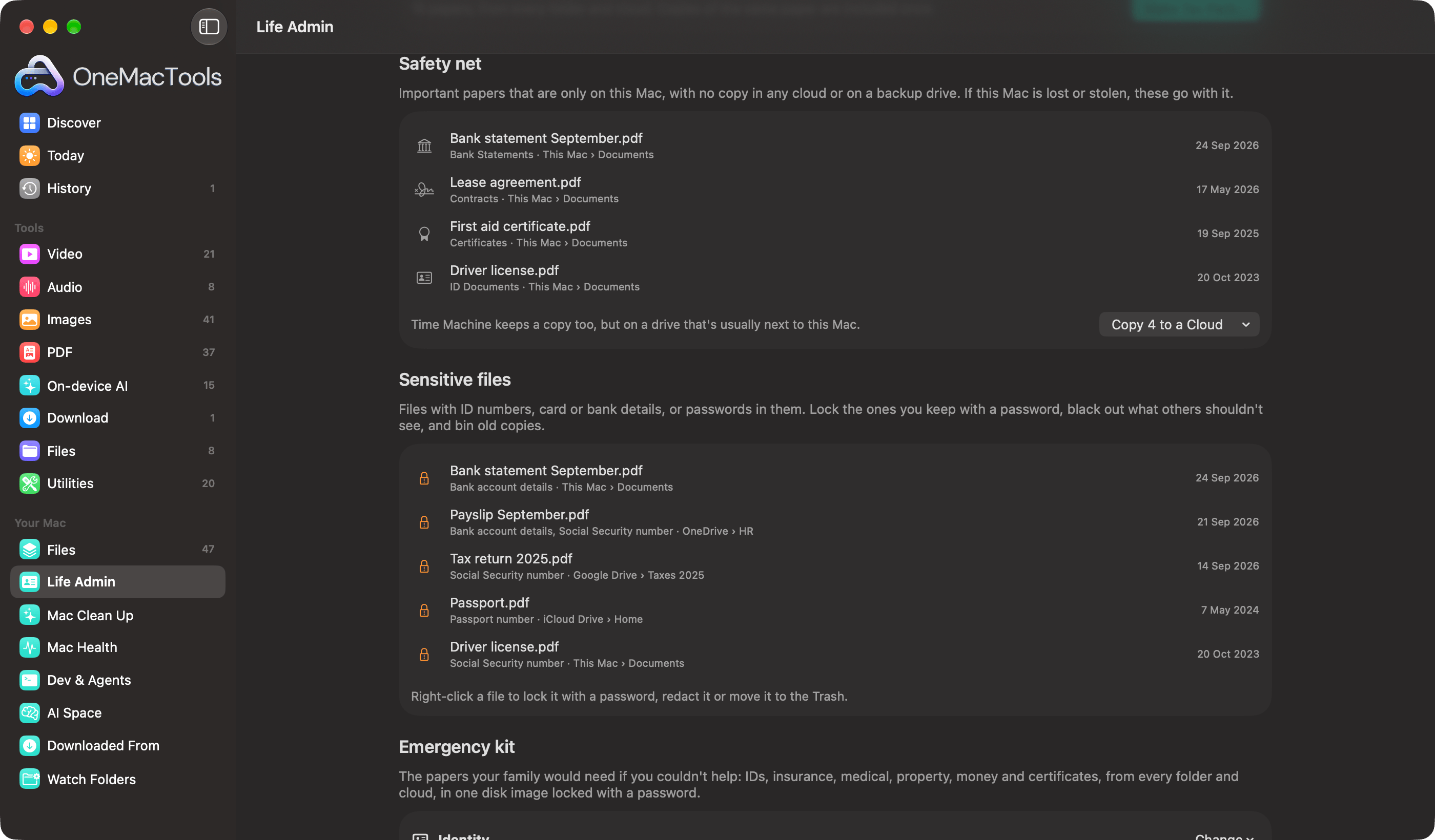
- Click Copy N to a Cloud.
- Choose a cloud from the menu (iCloud Drive, Google Drive, OneDrive, Dropbox or Box, whichever are on this Mac), or Choose a Folder… for anywhere else, such as a NAS.
- OneMacTools copies them into a folder called OneMacTools Safety Net, sorted into a folder per kind, and shows it in Finder.
It copies and never moves: the originals stay put, and a file already in the Safety Net folder is never replaced (a second copy gets a number). Once the copies sync, the papers drop off the list. If the list is empty you'll see Every important paper has a copy in a cloud or on a backup drive.
Sensitive files with ID or account numbers
Old scans of your passport in Downloads, a payslip with your bank details in a shared folder, a text file of passwords: Sensitive files finds files with these in them and shows which kind each holds, never the number itself.
| Region | What's looked for |
|---|---|
| United States | Social Security number, passport number, card number, bank account details, password |
| India | Aadhaar number, PAN, passport number, card number, bank account details, password |
Numbers are checked properly to avoid false alarms: a card number has to pass the card checksum, an Aadhaar number its own checksum and an Aadhaar context, and a Social Security number has to sit near the words “social security” or “SSN”. Each copy of a file is listed, since each is somewhere the number could be seen. Up to twenty show, newest first.
Right-click a file to deal with it:
- Lock with a Password… opens Password Protect PDF for a PDF, or Encrypt Files for anything else.
- Redact… opens Redact PDF or Redact Images, so you can black out the number on a copy you need to share.
- Move to Trash bins an old copy. It's recorded in History, where you can put it back.
What is an emergency document kit?
An emergency kit is the set of papers your family would need if you were in hospital or couldn't help: who you are, what you're insured for, your medical history, what you own and owe, and where your money is. Emergency kit picks them from every folder and cloud and sorts them into seven sections:
| Section | For example |
|---|---|
| 1 Identity | Passport, driver's license, Social Security card, green card (US); passport, Aadhaar, PAN, driving licence (India) |
| 2 Health insurance | Health insurance card, plan documents, mediclaim policy |
| 3 Life & other insurance | Life, auto and home insurance policies |
| 4 Medical | Prescriptions, reports, discharge summaries |
| 5 Property & contracts | Deed, lease, will, mortgage and loan papers |
| 6 Money | Latest bank statements, last tax return |
| 7 Certificates | Birth, marriage and degree certificates |
Life Admin fills each section with its newest suggestions: five for Identity and three for each of the others, one per paper even when you have several copies. Each paper shows a status:
- Ready: nothing to fix.
- Expired and a date: the paper itself says it has expired. Swap in the renewed one.
- Only copy is on this Mac: worth sending to a cloud with Safety net too.
- In the cloud only; downloaded when you export: just information.
- Missing: moved or deleted: you chose it earlier but it's no longer there.
Change what goes in
Each section has a Change menu. Tick or untick any of the suggestions, choose Add a File… for a paper Life Admin didn't suggest (it must be somewhere Files covers), Use Suggestions to go back to the automatic picks, or Leave Out of the Kit to skip a section entirely (Include This Section brings it back).
How to make and open the Emergency Kit
- Check each section, then click Make Emergency Kit….
- Type a password of at least 8 characters, and again to confirm.
- Leave Remind me to make it again in six months on if you want a nudge, then click Choose Where….
- Pick where the kit goes: a USB drive, or a cloud folder your family can reach. Click Save Kit Here.
OneMacTools copies the chosen papers into a disk image named like Emergency Kit 2026-10-24.dmg, encrypted with AES-256, and shows it in Finder. Papers only in a cloud are downloaded as they're copied; any that couldn't be (a cloud offline) are counted in the message.
Inside the disk image there's a numbered folder for each section and a README.txt that lists every paper with where the original lives and, for IDs and policies, when it expires.
To open it on any Mac, double-click the .dmg, type the password, and it appears in Finder like a drive. Eject it when you're done.
After you make it, the section shows Last made with the date. If you asked for the reminder, a notification at 9 in the morning six months later says Time to refresh your Emergency Kit. Make it again whenever your papers change; each kit is a fresh file.
Tools mentioned on this page
Questions
What should be in an emergency document kit?
IDs, health and other insurance policies, medical records, property and loan papers, recent bank statements and your last tax return, and birth, marriage and degree certificates. OneMacTools sorts these into seven numbered sections and suggests the newest of each from your Mac and clouds.
Is the Emergency Kit encrypted?
Yes. It's a macOS disk image encrypted with AES-256 and locked with the password you choose. It opens on any Mac by double-clicking it and typing the password; without the password it can't be opened.
Does Tax Pack move my files?
No. It copies the year's papers into a new folder and leaves every original where it is. Papers only in a cloud are downloaded by their cloud app as they're copied.
Can I send the Tax Pack to my accountant as one file?
Yes. Zip the Tax Pack folder with Create Zip, or use Encrypt Files to lock it with a password before emailing it. Both are OneMacTools tools you can run straight from Finder.
Why does a paper show “Only copy is on this Mac” when I use Time Machine?
Safety net counts copies in a cloud or on an external drive Files covers. A Time Machine backup isn't searched, and it usually sits next to the Mac, so a theft or fire can take both. Copy the paper to a cloud with Copy to a Cloud.
Does OneMacTools see my Social Security or Aadhaar number?
It notes that a file contains that kind of number so it can list the file under Sensitive files. The number itself is never shown in the app, in Ask or to AI assistants, and nothing is uploaded.
