
Life Admin: track passport, licence and insurance expiry dates on your Mac
Life Admin tracks passport, licence and insurance expiry dates on your Mac by reading the documents you already have. It finds IDs, policies, certificates and tickets that expire, warranties that end, and what your receipts add up to, then reminds you 30 and 7 days before each date. Everything is read on your Mac while it's plugged in and you're away, and nothing leaves it.
On this page
- What Life Admin does
- How to turn on Life Admin
- How Life Admin reads your documents
- The Expiring soon list, explained
- Expiry reminders 30 and 7 days before
- Choosing your region: United States or India
- Ask questions about your papers
- Privacy: is it safe to let an app read my passport?
- Tools mentioned on this page
- Questions
What Life Admin does
Most people find out their passport has expired when they book a flight. The date was always there, printed on a PDF or a scan in Documents, iCloud Drive or Google Drive; nobody was reading it. Life Admin is the screen in OneMacTools that reads those papers for you and turns them into a list of dates.
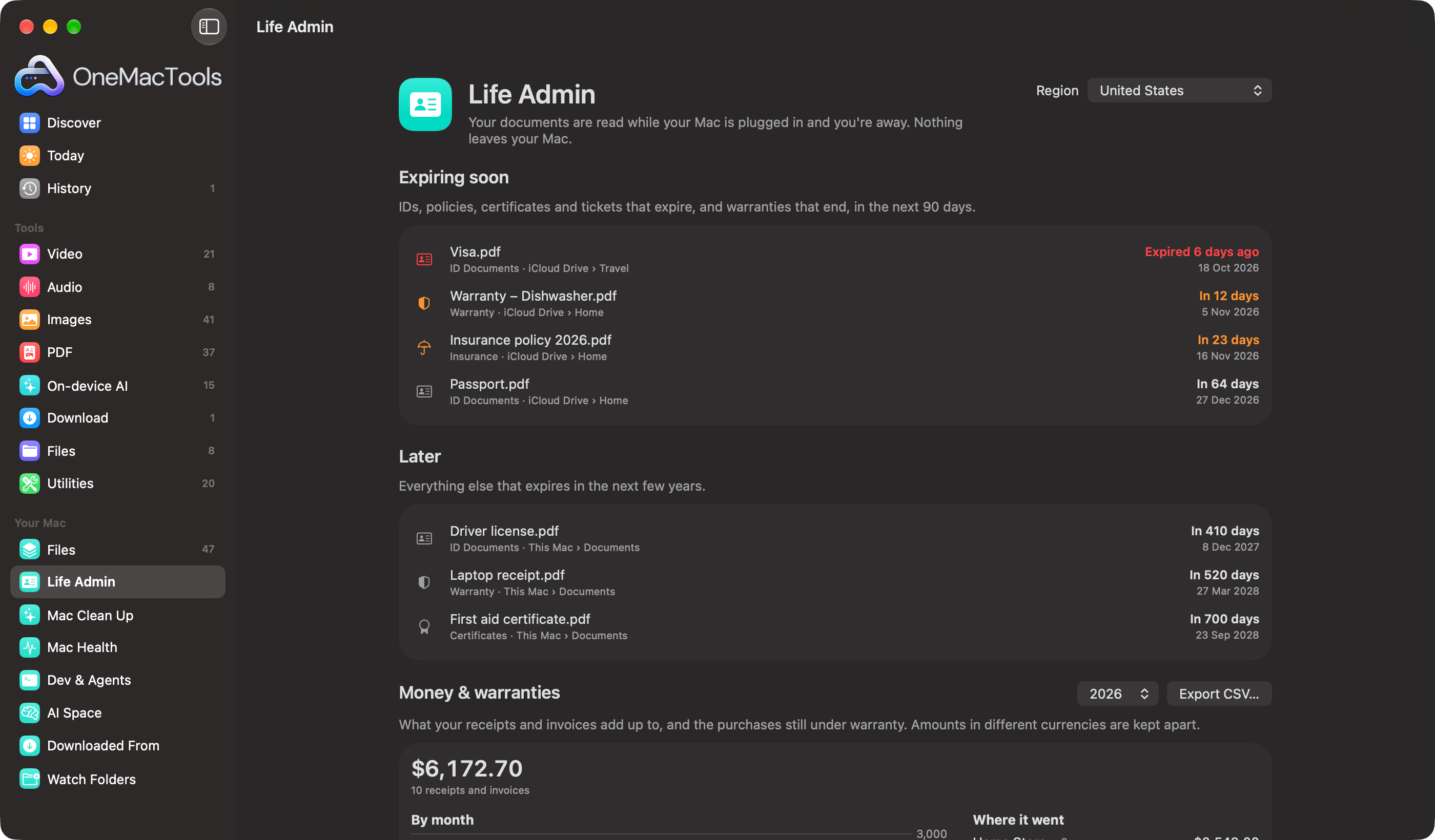
You'll find it in the sidebar under Your Mac, between Files and Mac Clean Up. From top to bottom the page shows:
| Section | What it shows |
|---|---|
| Expiring soon | IDs, policies, certificates and tickets that expire, and warranties that end, in the next 90 days (and anything that expired in the last 30). |
| Later | Everything else that expires in the next few years, up to 30 rows. |
| Money & warranties | What your receipts and invoices add up to in a tax year, by month and merchant, and purchases still under warranty. |
| Tax Pack | The year's tax forms, payslips, statements, invoices, receipts and insurance papers, ready to copy into one folder. |
| Safety net | Important papers that exist only on this Mac. |
| Sensitive files | Files with ID, card or account numbers, or passwords, in them. |
| Emergency kit | The papers your family would need, in one password-protected disk image. |
This page covers how Life Admin reads your documents, the expiry list, reminders, regions and asking questions. The money and safety sections have their own page: Tax documents and the Emergency Kit.
How to turn on Life Admin
Life Admin reads your papers through Files, the index of every file on your Mac and in your clouds. Until Files is on, Life Admin shows Life Admin reads your papers through Files with an Open Files button.
- Click Life Admin in the sidebar, then Open Files (or click Files under Your Mac).
- Tick the places to include: your home folders and any clouds OneMacTools found, such as iCloud Drive, Google Drive, OneDrive, Dropbox or Box.
- Click Index My Files. The first look takes a minute or two, and macOS may ask you to let OneMacTools see your Desktop, Documents and Downloads.
- Go back to Life Admin and pick your country from the Region menu at the top right.
- Leave your Mac plugged in. Your documents are read the next time you step away from it.
There's nothing else to set up. You don't tag documents, move them into a special folder or type dates in. Files and how it lists cloud files without downloading them are covered in Search all your cloud files.
How Life Admin reads your documents
Reading happens in the background, only at good moments: your Mac is on power, you haven't touched it for a minute, it isn't running hot and Low Power Mode is off. It pauses as soon as you come back. On a laptop running on battery, nothing is read until you plug in.
Which files are read
- Documents: PDF, Word (
.doc,.docx), RTF, OpenDocument text (.odt) and plain text. - Images that look like papers: screenshots, and photos or scans whose names suggest a paper (scan, passport, licence, statement, invoice, receipt, card, insurance, policy, certificate, bill and so on). Their text is recognised on your Mac.
- The newest 4,000 documents and 700 images. That covers anyone's papers without crawling a ten-year archive.
Each file is read once. It's read again only if it changes, so a renewed policy saved over the old PDF gets its new date.
What it recognises
From the name and the words inside, every document is sorted into kinds: Invoices, Receipts, Bank Statements, Payslips, Tax Documents, ID Documents, Tickets & Travel, Certificates, Resumes, Contracts, Medical and Insurance. A US payslip is spotted by words like “gross pay” and “federal withholding”; an Indian one by “basic salary” and “provident fund”. A passport, Aadhaar letter, driver's license or green card lands in ID Documents.
For IDs, insurance, certificates, contracts, medical papers and tickets, Life Admin then looks for an expiry date written just after phrases such as “Date of Expiry”, “expires on”, “valid until”, “valid thru”, “renewal date” or “policy end”. When a document shows several, such as a renewed licence that still prints the old date, the latest wins.
Receipts and invoices give up their total, the merchant and the date, plus when a warranty ends if the receipt says something like “1 year warranty” or “warranty: 24 months”. That's how a dishwasher bought last November turns up in Expiring soon a year later.
Papers that are only in the cloud
Files lists cloud-only files without downloading them, so their contents can't be read. When some of them are plainly named as important papers (a passport, a policy bond, a deed), Life Admin shows a card: N important papers in your clouds haven't been read. Click Read Them…, check the total size, and choose Download, Read and Put Back. Each one (up to 25 MB, PDF, Word or an image) is downloaded by its cloud app, read on your Mac and handed back to the cloud so it takes no space here. A few hundred take a few minutes.
The Expiring soon list, explained
Each row shows the file name, what kind of paper it is and where it lives (for example ID Documents · iCloud Drive › Travel), then how long is left and the date.
| What you see | What it means |
|---|---|
| Expired 6 days ago in red | The date has passed. Expired papers stay in the list for 30 days so you notice. |
| In 12 days in orange | 30 days or fewer left. |
| In 64 days | More than a month left. |
| Today | It expires today. |
| Shield icon, Warranty | A purchase whose warranty ends, read from its receipt. |
Double-click a row to open the document. Right-click for Open, Show in Finder and Quick Look. If the same paper sits in two places, say Downloads and iCloud Drive, it shows once, preferring the copy on this Mac.
Later lists everything further out, so your driving licence that runs out in 2028 is there too, without crowding the top of the page.
Expiry reminders 30 and 7 days before
After every reading, Life Admin sets Mac notifications for each document that expires, and each warranty that ends, in the next 13 months. You get two: one 30 days before and one 7 days before, both at 9 in the morning.
A reminder reads like An ID document expires in 30 days, with the file name, where it is and the date underneath. Warranties say The warranty on Laptop receipt.pdf ends in 7 days.
- Reminders are rebuilt after each reading, so once you save the renewed passport, the old reminders go away.
- macOS asks once for permission to show notifications. If you said no, turn them on in System Settings › Notifications › OneMacTools.
- Reminders follow Notify me when background jobs finish in Settings. Turn that off and no expiry reminders are set. See the settings reference.
- Up to 60 reminders are kept at a time, nearest first.
This is different from Apple's Reminders or Calendar: you don't have to remember to create the reminder in the first place. The date comes straight from the paper.
Choosing your region: United States or India
The Region menu at the top of Life Admin changes three things:
| United States | India | |
|---|---|---|
| Tax year | January to December, shown as 2026 | April to March, shown as FY 2026-27 |
| Currency a receipt is assumed to be in when it doesn't say | USD | INR |
| ID numbers looked for in Sensitive files | Social Security number, passport, card, bank account, password | Aadhaar, PAN, passport, card, bank account, password |
| Emergency kit examples | Passport, driver's license, Social Security card, green card | Passport, Aadhaar, PAN, driving licence |
OneMacTools picks India when your Mac's region is India, and the United States otherwise. The United Kingdom, Canada, Australia, the United Arab Emirates and the European Union are listed as coming soon. Expiry dates are read from papers in any country already; the region mainly matters for tax years and ID numbers.
Ask questions about your papers
Press ⌘K (or choose Go › Ask…) and type a question in plain words. Ask recognises questions about papers and answers them from what Life Admin found, instantly and without reading anything again.
| Try asking | You get |
|---|---|
| when does my passport expire? | The date and how many days are left, with the file and where it is. |
| is the TV still under warranty? | Warranties, from receipts. |
| how much did I spend at Amazon this year? | A total per currency, with the receipts behind it. |
| which papers aren't backed up? | Papers that exist only on this Mac. |
| tax papers for 2025 | Counts by kind for that tax year, and the files. |
| which files have my SSN? | Files with that kind of number, never the number itself. |
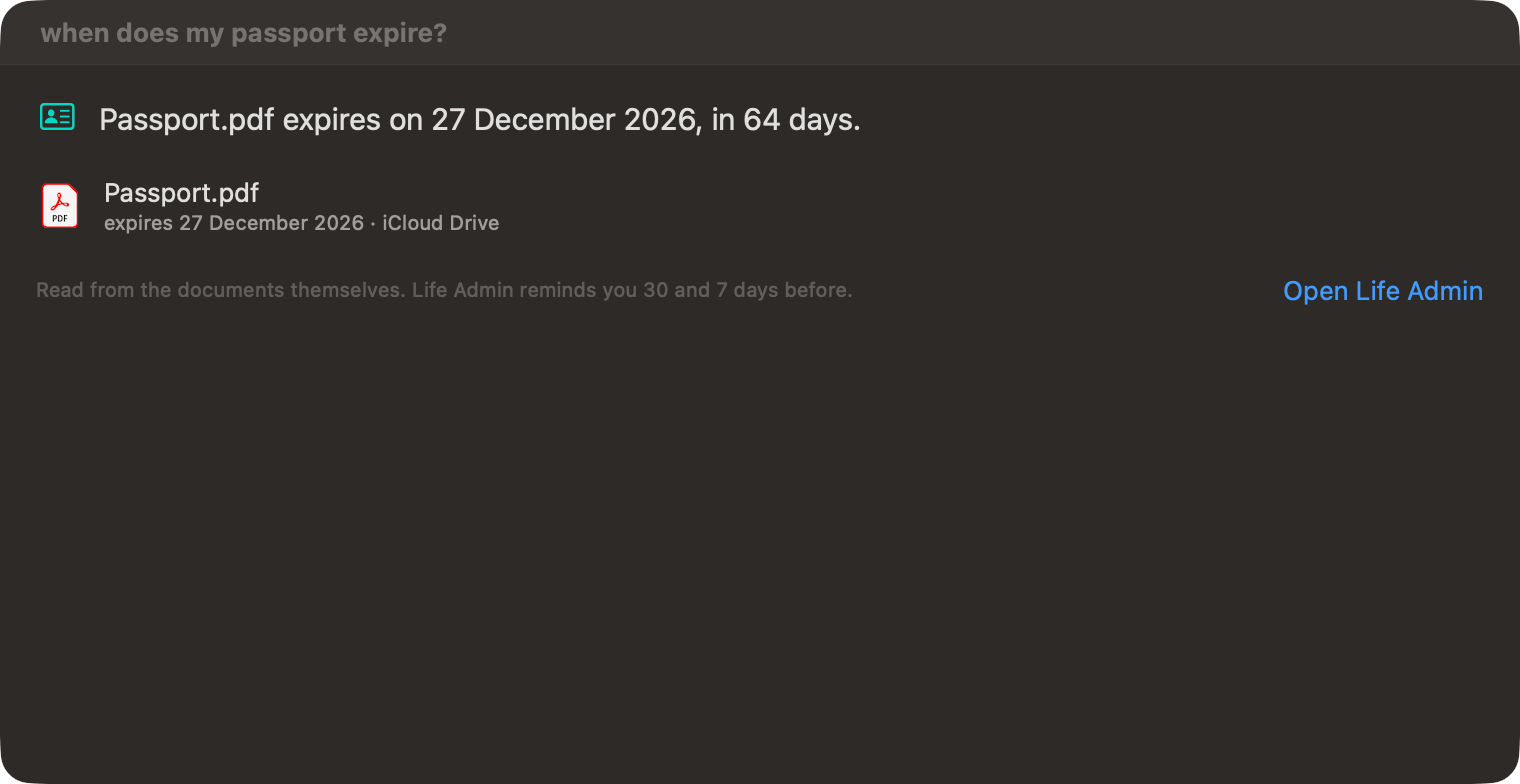
Each answer ends with a short note on where it came from and an Open Life Admin link. If Files is off, Ask tells you so instead of guessing. More on Ask in Ask your Mac in plain English.
AI assistants connected through the OneMacTools MCP server can ask the same kinds of questions about expiry dates, spending and tax papers. They see summaries, never ID numbers, and reading a document's text needs your approval each time (how approvals work).
Privacy: is it safe to let an app read my passport?
Life Admin is built so your papers never have to leave your Mac:
- Documents are read on your Mac with Apple's own frameworks, in a separate short-lived process. No document, text or number is uploaded.
- What's found (kinds, dates, totals) is kept in Files' private index on your Mac.
- Cloud-only papers are downloaded only when you click Read Them…, and handed back to the cloud afterwards.
- Sensitive files lists which kinds of numbers a file holds; the numbers themselves are never shown anywhere in the app.
To stop it, turn off Files from the Files screen (Turn Off Files…). Turn Off and Delete the Index removes everything Files and Life Admin learned. Read the full privacy policy and how OneMacTools uses Full Disk Access and other permissions.
Tools mentioned on this page
Questions
How do I get reminded before my passport expires on a Mac?
Turn on Files in OneMacTools and keep your passport scan or PDF somewhere Files covers, such as Documents or iCloud Drive. Life Admin reads the expiry date and sends a Mac notification 30 days and 7 days before, at 9 in the morning. You don't create the reminder yourself.
Why isn't my insurance policy showing in Expiring soon?
Either it hasn't been read yet (reading happens while your Mac is plugged in and idle), it's only in a cloud (use Read Them… on the cloud card), or the date isn't written next to wording like “policy end”, “valid until” or “expiry date”. Ask “when does my car insurance expire?” with ⌘K to see what Life Admin found.
Can Life Admin read scanned or photographed documents?
Yes. Screenshots, and images whose names suggest a paper (scan, passport, licence, receipt, policy and the like), have their text recognised on your Mac. A clear scan works best; a blurry photo may not give a readable date.
Does Life Admin work on battery?
It shows what it has already found at any time, but it reads new documents only when your Mac is on power, idle for a minute, not hot and not in Low Power Mode. Plug in and step away, and it catches up.
Does it read every PDF on my Mac?
It reads the newest 4,000 documents and 700 paper-like images in the places Files covers, once each. Files that change are read again. Very old archives beyond that aren't read.
Can I use Life Admin outside the US and India?
Expiry dates and warranties are read from papers in any country. The region setting, which decides the tax year, default currency and which ID numbers are looked for, offers the United States and India today, with the UK, Canada, Australia, the UAE and the EU coming.
