
Make passport and visa photos on Mac
Passport and visa photos for India, the US, UK, Schengen, Canada and more, on white, with a print sheet.
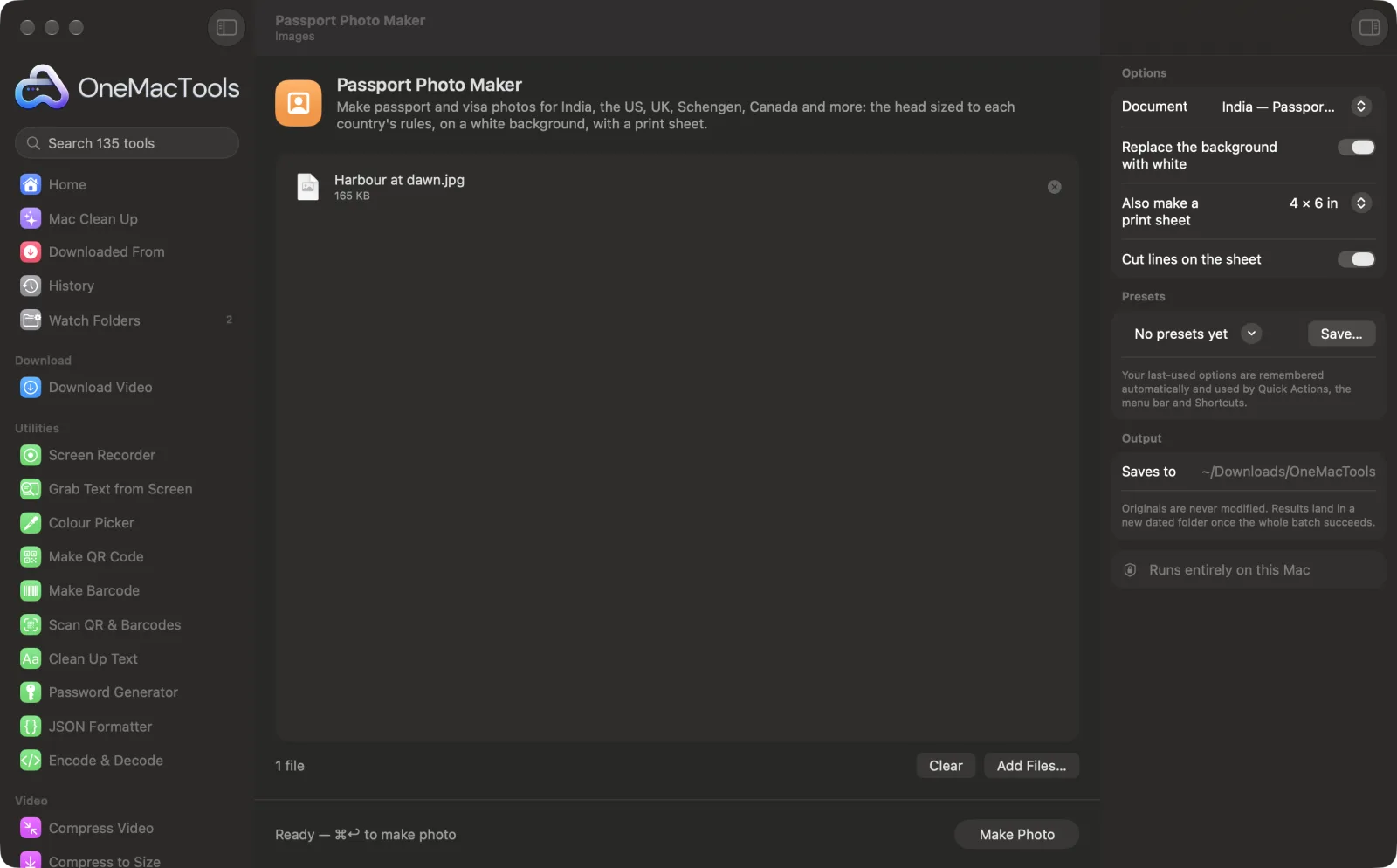
Passport Photo Maker on a Mac
Screenshots from the app, using sample files.
How to use Passport Photo Maker
- 1
Take a clear photo
Face the camera with your whole head and shoulders in view, in even light, with a neutral expression. Any background works if you let the app replace it.
- 2
Choose the document
India passport or OCI and visa, US, UK, Schengen and EU, Canada, Australia, UAE, Singapore, China or Japan. The photo size and head size follow that choice.
- 3
Choose a print sheet
Pick 4 × 6 in, 5 × 7 in or A4 to get a sheet of copies to print, or No for just the single photo.
- 4
Click Make Photo
The face is found, the head is sized and centred, the background is made white and a 300 DPI photo is saved.
- 5
Check, then print or upload
Open the results in a dated folder in Downloads › OneMacTools with the Preview (eye) button or Show in Finder. Compare them with the official, current rules for your document before you submit.
What Passport Photo Maker does
Choose the document and OneMacTools finds the face, sizes the head (chin to crown) to that country's rules, centres it, replaces the background with white and saves a 300 DPI photo. It can also tile copies on a 4 × 6 in, 5 × 7 in or A4 sheet with cut lines, ready for a photo printer. Rules change, so check the latest requirements before you submit.
Great for
- Renew a passport without a photo studio
- Print visa photos at a photo kiosk
- Make photos for the whole family at once
Options explained
- Document
- Which photo to make: India passport (35 × 45 mm), India OCI and visa (2 × 2 in), United States passport and visa (2 × 2 in), United Kingdom, Schengen and EU, Australia, Singapore and Japan (35 × 45 mm), Canada (50 × 70 mm), UAE (40 × 60 mm) or China (33 × 48 mm). Each sets the photo size and the target head size from chin to crown.
- Replace the background with white
- On by default. Separates you from the background and puts you on plain white. Turn it off if you already took the photo against a plain white wall and prefer the original edges.
- Also make a print sheet
- No, 4 × 6 in, 5 × 7 in or A4; the default is 4 × 6 in. Tiles as many copies as fit, centred, with small gaps, saved at 300 DPI.
- Cut lines on the sheet
- On by default. Draws light dashed lines around each copy on the print sheet so they're easy to cut out evenly.
Best practices
- Stand a little away from the wall, face the light, and have someone take the photo at eye level. Shadows behind you and a tilted head are harder to fix later.
- Leave space around your head and shoulders in the original. The app needs your whole head, including hair, to size it correctly.
- Print the sheet at actual size (100%), not “fit to page”, or the photos will come out the wrong size.
- Check the photo against the official rules for expression, glasses, head coverings and how recent it must be. These are up to you, and they change.
- Make photos for the whole family in one go: drop everyone's photos in together and each gets its own photo and sheet.
Works with
- In
- A clear, front-facing photo (JPEG, HEIC, PNG and other formats your Mac can open). Several at once is fine.
- Out
- A 300 DPI JPEG at the document's size, named with “passport” and the size in mm, plus a print sheet JPEG if you chose one.
- Needs a visible face. If no face is found, the app asks for a clear, front-facing photo with the whole head visible.
- Requirements change and are set by each issuing authority, so always check the current official rules (for India, Passport Seva) before submitting. No tool can promise a photo will be accepted.
Questions about Passport Photo Maker
What size is an Indian passport photo?
Passport Seva has used 35 × 45 mm with a white background, and OCI and many visa forms use 2 × 2 inches. Both are built in; check Passport Seva or the visa instructions for the current rules before submitting.
What size is a US passport photo?
2 × 2 inches, with the head taking up most of the height. Choose “United States — passport & visa (2 × 2 in)” and check the State Department's current guidance before you submit.
How many photos fit on a 4 × 6 sheet?
Six 35 × 45 mm photos fit on a 4 × 6 in print with gaps to cut, and the app tells you the count when it's done. Larger sizes such as 2 × 2 in fit fewer, and A4 fits many more.
Can I take a passport photo at home with my phone?
Yes, as long as the photo is sharp, evenly lit and front-facing, with your whole head and shoulders in view. The app handles the size, head position and white background.
Will my photo definitely be accepted?
No tool can promise that. The app gets the size, head size, centring and white background in line with the rule it has for your document, but expression, lighting, glasses and recency are up to you, and requirements change, so check the official rules.
Can I print passport photos at a photo kiosk or shop?
Yes. Take the 4 × 6 in or 5 × 7 in sheet JPEG and ask for it to be printed at that size without cropping or scaling.
Does Passport Photo Maker upload my files?
No. Passport Photo Maker runs entirely on your Mac, so your files never leave it and it works offline.
Will Passport Photo Maker change my original files?
No. Results are saved as new files in a dated folder in Downloads › OneMacTools, and your originals are left exactly as they were unless you turn on an option that says otherwise.
What does Passport Photo Maker need?
Just a Mac with macOS 26 or later. There's nothing else to install.
Do this next
Photos, thumb impressions and declarations for exam and job forms: exact pixels, inside the KB window.
Image Info & EXIF ViewerSee size, dimensions, format and DPI, plus the camera, date and location hidden in a photo.
Related Images tools
Convert between PNG, JPEG, HEIC, AVIF and TIFF. Reads WebP, RAW and more.
Compress ImagesShrink photos for email and the web, with a live before-and-after preview.
Convert to WebPMake small, web-ready WebP images, lossy or lossless, with transparency kept.
Resize ImagesResize by longest edge, exact pixels, percentage, or print size in cm, mm or inches at the DPI you need.
Crop ImagesCrop to an aspect ratio or an exact area, or trim plain borders automatically — one photo or a whole folder.
Rotate & Flip ImagesTurn or mirror photos in one go.

Passport Photo Maker, plus 134 more.
One app. One price.
All 135 tools for $29, once. 14-day money-back guarantee.