
Convert PDF to PDF/A on Mac
Make archival PDF/A files for courts, governments and long-term records.
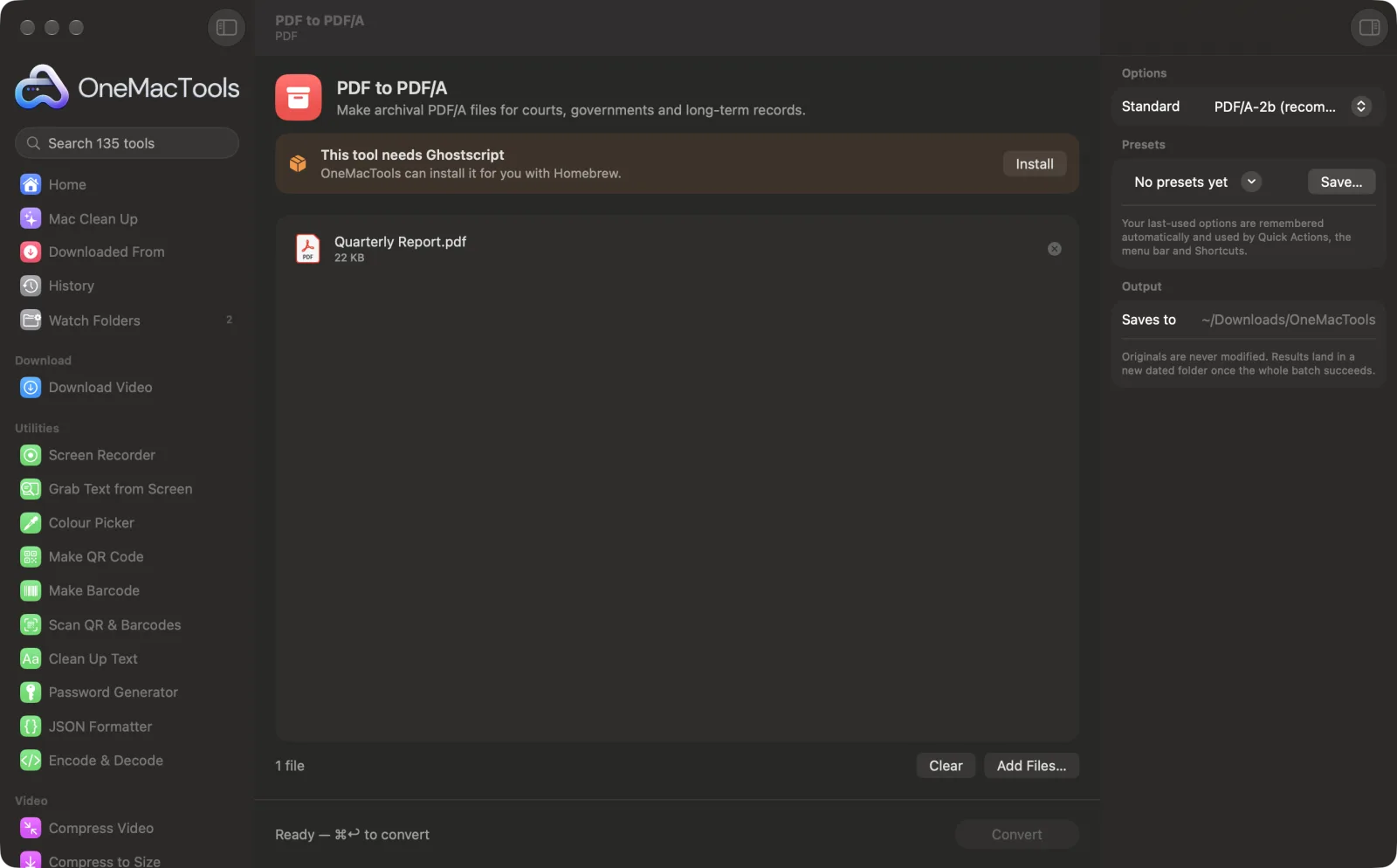
PDF to PDF/A on a Mac
Screenshots from the app, using sample files.
How to use PDF to PDF/A
- 1
Install Ghostscript once
If it isn't installed yet, OneMacTools offers to install Ghostscript through Homebrew with one click.
- 2
Add the PDF
Drop one or more PDFs onto PDF to PDF/A.
- 3
Choose the standard
In the right-hand panel, pick PDF/A-2b unless the place you're sending it to asks for another level.
- 4
Convert
Click Convert. Ghostscript embeds the fonts and defines the colours the standard requires.
- 5
Check and send
The file, named “<name> PDF-A”, is saved in a dated folder in Downloads › OneMacTools.
What PDF to PDF/A does
PDF/A is the archival version of PDF that courts, tax offices and archives ask for: fonts embedded, colours defined and nothing that depends on the internet. OneMacTools converts to PDF/A-2b (or 1b or 3b) using the open-source Ghostscript engine, which it can install for you.
Uses Ghostscript, the free open-source PDF engine, which OneMacTools installs for you with one click through Homebrew.
Great for
- File documents with a court
- Submit records to a government portal
- Archive contracts for the long term
Options explained
- Standard
- PDF/A-2b (recommended), the default, is the most widely asked-for level. PDF/A-1b is the oldest and strictest, for systems that only accept it. PDF/A-3b also allows attached files, as some e-invoicing formats need.
Best practices
- Check what the court, office or archive asks for. If it just says PDF/A, PDF/A-2b is the usual choice.
- If a portal rejects the file, run it through a PDF/A validator, which tells you exactly what it objects to. OneMacTools can't promise every portal will accept the result.
- Colours are converted to RGB with an sRGB profile, so print-ready CMYK files may shift slightly.
- Remove any password first with Remove PDF Password; archival files can't be encrypted.
- Keep your original PDF too. PDF/A conversion can make some files noticeably larger because fonts are embedded.
Works with
- In
- PDF files, one or many at once.
- Out
- A PDF/A-2b, 1b or 3b copy of each PDF, named “<name> PDF-A”.
- Needs Ghostscript, the free open-source PDF engine (one-click install through Homebrew).
- Whether a particular court or portal accepts the file depends on its own checks.
Questions about PDF to PDF/A
How do I convert a PDF to PDF/A on a Mac?
Drop the PDF onto PDF to PDF/A, leave Standard on PDF/A-2b and click Convert. The archival copy is saved in Downloads › OneMacTools.
What is PDF/A?
An archival version of PDF designed to look the same in decades to come: fonts are embedded, colours are defined and nothing depends on outside resources.
Which PDF/A version should I choose?
PDF/A-2b unless you're told otherwise. Choose 1b only if a system insists on it, and 3b if you need to attach files, as some e-invoicing formats do.
What does the b in PDF/A-2b mean?
Basic conformance: the pages are guaranteed to look the same when reopened. It's the level most courts and archives ask for.
Will a court or government portal accept the file?
The file is made to the PDF/A standard, but every portal runs its own checks, so we can't promise acceptance. If it's rejected, a PDF/A validator will show why.
Why do I need Ghostscript?
Ghostscript is the free, open-source engine that does the conversion. OneMacTools installs it through Homebrew with one click and runs it on your Mac.
Does PDF to PDF/A upload my files?
No. PDF to PDF/A runs entirely on your Mac, so your files never leave it and it works offline.
Will PDF to PDF/A change my original files?
No. Results are saved as new files in a dated folder in Downloads › OneMacTools, and your originals are left exactly as they were unless you turn on an option that says otherwise.
What does PDF to PDF/A need?
macOS 26 or later and Ghostscript, the free open-source PDF engine, which OneMacTools can install for you through Homebrew with one click.
Do this next
Shrink image-heavy PDFs for email and upload.
Sign PDFType your name, or drop a signature image with the PDF, and place it on the page.
Edit PDF MetadataSet the title, author and keywords; clear hidden details; remove comments and links.
Related PDF tools
Combine PDFs into one, in the order you choose, or alternate pages to join front and back scans.
Split PDFSplit by pages, chapters (bookmarks), file size or where a word appears, or cut two-page scans in half.
Organize PDFReverse, reorder or split out odd and even pages.
Delete PagesRemove the pages you don't need.
Extract PagesPull the pages you want out into a new PDF.
Rotate PDF PagesTurn or flip some or all pages.

PDF to PDF/A, plus 134 more.
One app. One price.
All 135 tools for $29, once. 14-day money-back guarantee.