
Convert Excel, PowerPoint and Word to PDF on Mac without Office
Excel, PowerPoint, Word, Keynote, Numbers and Pages to PDF, offline, with no Office needed.
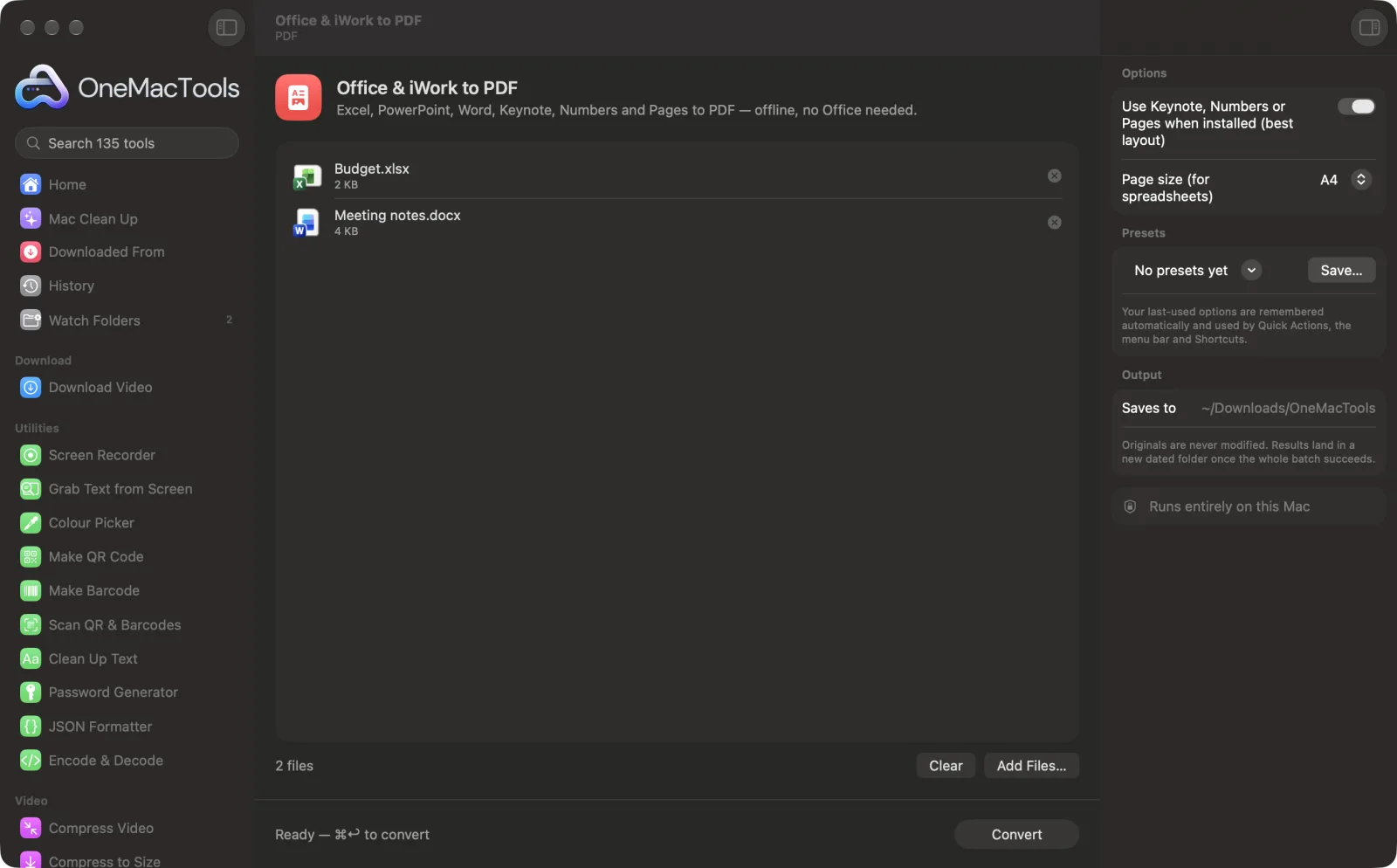
Office & iWork to PDF on a Mac

Screenshots from the app, using sample files.
How to use Office & iWork to PDF
- 1
Add your files
Drop Excel, PowerPoint, Word, Keynote, Numbers or Pages files onto Office & iWork to PDF.
- 2
Choose the converter
Leave Use Keynote, Numbers or Pages when installed on for the most faithful layout.
- 3
Pick a page size
Choose A4 or US Letter for spreadsheets and documents converted without the iWork apps.
- 4
Convert
Click Convert. The first time, macOS may ask whether OneMacTools can control Keynote, Numbers or Pages; allow it.
- 5
Open the PDFs
Each file becomes a PDF of the same name in a dated folder in Downloads › OneMacTools.
What Office & iWork to PDF does
Convert .xlsx, .xls, .pptx, .ppt, .docx and .doc, plus Keynote, Numbers and Pages files, to PDF. When Apple's free Keynote, Numbers or Pages apps are installed, OneMacTools has them do the export for the most faithful layout; otherwise it uses the Office reader built into macOS. Nothing is uploaded.
Great for
- Send a spreadsheet as a PDF without owning Excel
- Turn a PowerPoint deck into a handout
- Convert Pages documents for people on Windows
Options explained
- Use Keynote, Numbers or Pages when installed (best layout)
- On by default. When the matching Apple app is installed, it opens the file, exports it as PDF and closes it again: Keynote for presentations, Numbers for spreadsheets, Pages for documents. Turn it off to use the Office reader built into macOS instead.
- Page size (for spreadsheets)
- A4 (the default) or US Letter. Used when a file is converted with the macOS Office reader rather than an iWork app; presentations are turned to landscape.
Best practices
- Install Keynote, Numbers and Pages from the App Store. They're free, and they give the closest match to the original layout.
- Keynote, Numbers and Pages files can only be converted when their app is installed.
- If macOS asks to let OneMacTools control an app, allow it. You can change this later in System Settings › Privacy & Security › Automation.
- Complex spreadsheets look best through Numbers. Set the print area and page setup there first if you need a particular layout.
- Convert a whole folder of files in one go by dropping them all in together.
Works with
- In
- Word (.docx, .doc), Excel (.xlsx, .xls), PowerPoint (.pptx, .ppt), OpenDocument spreadsheets and presentations (.ods, .odp), and Keynote, Numbers and Pages files.
- Out
- A PDF of each file, with the same name.
- Uses Keynote, Numbers or Pages when installed, otherwise the Office reader built into macOS.
- Keynote, Numbers and Pages files need their app installed.
- No Microsoft Office needed.
Questions about Office & iWork to PDF
How do I convert Excel to PDF on a Mac without Office?
Drop the .xlsx file onto Office & iWork to PDF and click Convert. If Numbers is installed it does the export; otherwise the Office reader built into macOS is used.
How do I convert PowerPoint to PDF on a Mac without PowerPoint?
Drop the .pptx onto Office & iWork to PDF and click Convert. With Keynote installed, each slide becomes a PDF page laid out just as in the deck.
Can I convert Word, Excel or PowerPoint to PDF without Microsoft Office?
Yes. OneMacTools uses Apple's free Keynote, Numbers and Pages apps when they're installed for the most faithful layout, or the Office reader built into macOS when they're not.
Why does it say I need Keynote, Numbers or Pages?
Keynote, Numbers and Pages files can only be read by their own apps. Install the app from the App Store (it's free) and convert again.
Why did macOS ask for permission to control Keynote, Numbers or Pages?
OneMacTools asks the app to export the PDF for you. Allow it once; you can change it in System Settings › Privacy & Security › Automation.
How do I convert Pages to PDF for someone on Windows?
Drop the .pages file in and click Convert. Pages exports it as a PDF that opens anywhere.
Which is better, the iWork apps or the built-in reader?
The iWork apps give the closest match to the original layout. The built-in reader works without them but may simplify complex pages.
Does Office & iWork to PDF upload my files?
No. Office & iWork to PDF runs entirely on your Mac, so your files never leave it and it works offline.
Will Office & iWork to PDF change my original files?
No. Results are saved as new files in a dated folder in Downloads › OneMacTools, and your originals are left exactly as they were unless you turn on an option that says otherwise.
What does Office & iWork to PDF need?
Just a Mac with macOS 26 or later. There's nothing else to install.
Do this next
Combine PDFs into one, in the order you choose, or alternate pages to join front and back scans.
Compress PDFShrink image-heavy PDFs for email and upload.
Add PasswordAdd a password needed to open the PDF.
Related PDF tools
Split by pages, chapters (bookmarks), file size or where a word appears, or cut two-page scans in half.
Organize PDFReverse, reorder or split out odd and even pages.
Delete PagesRemove the pages you don't need.
Extract PagesPull the pages you want out into a new PDF.
Rotate PDF PagesTurn or flip some or all pages.
Grayscale & Flatten PDFMake print-ready copies: lock form fields and annotations into the page, or convert to black and white.

Office & iWork to PDF, plus 134 more.
One app. One price.
All 135 tools for $29, once. 14-day money-back guarantee.